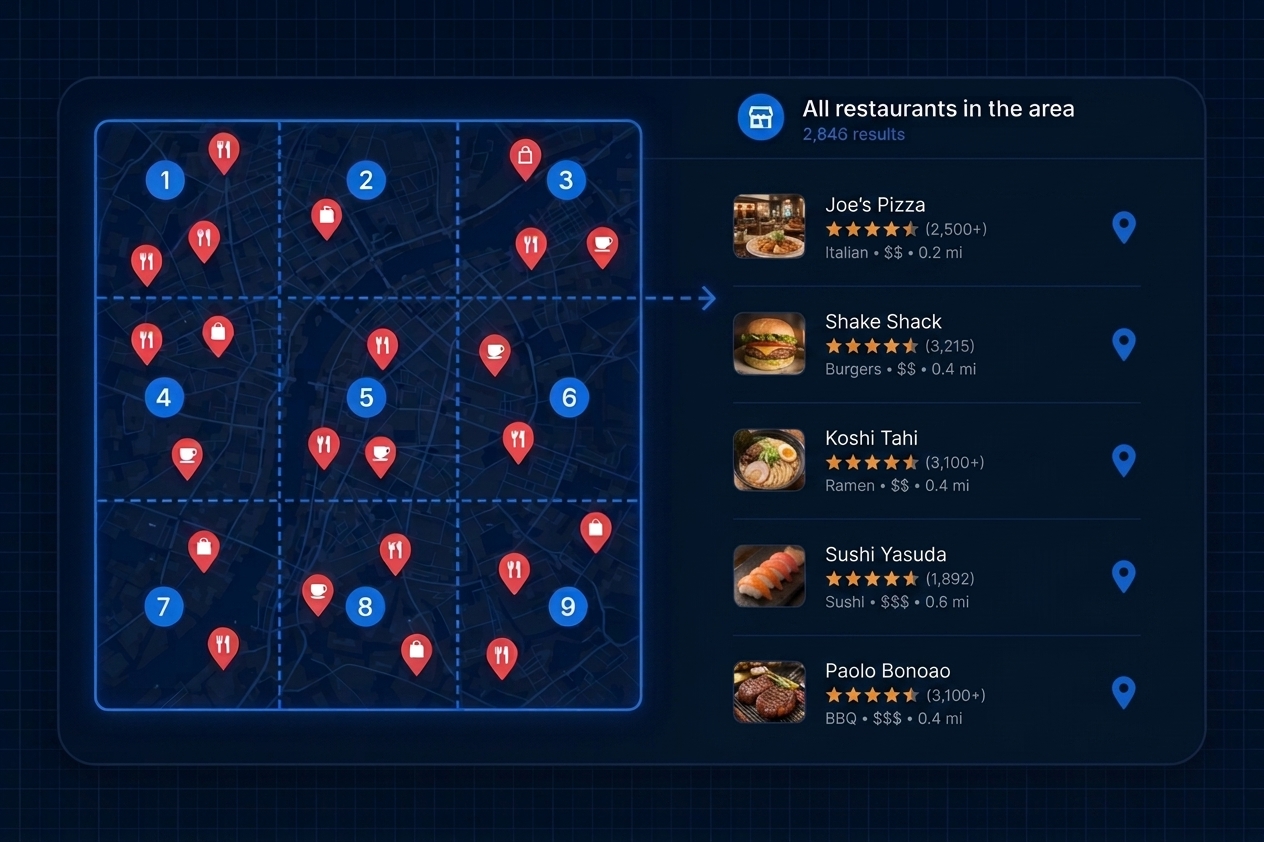
A Google Maps MCP server connects an AI application to tools that can work with Google Maps-related data.
Instead of manually searching for businesses, calling separate APIs, exporting results and then passing that data to an AI assistant, an MCP-enabled AI application can use connected tools as part of the task itself.
For example, a user could ask:
Find 50 dental clinics in Austin with websites and available emails. Keep businesses rated above 4.2 and organize the results into a structured list.
If the connected MCP server provides the required business-data tools, the AI can request the external data and continue working with the returned records.
At a high level, the workflow becomes:
The important idea is that MCP gives AI applications a standardized way to access external capabilities.
The AI is still responsible for understanding the task. The MCP server provides the tools and data it cannot obtain on its own.
What Is MCP?
MCP stands for Model Context Protocol.
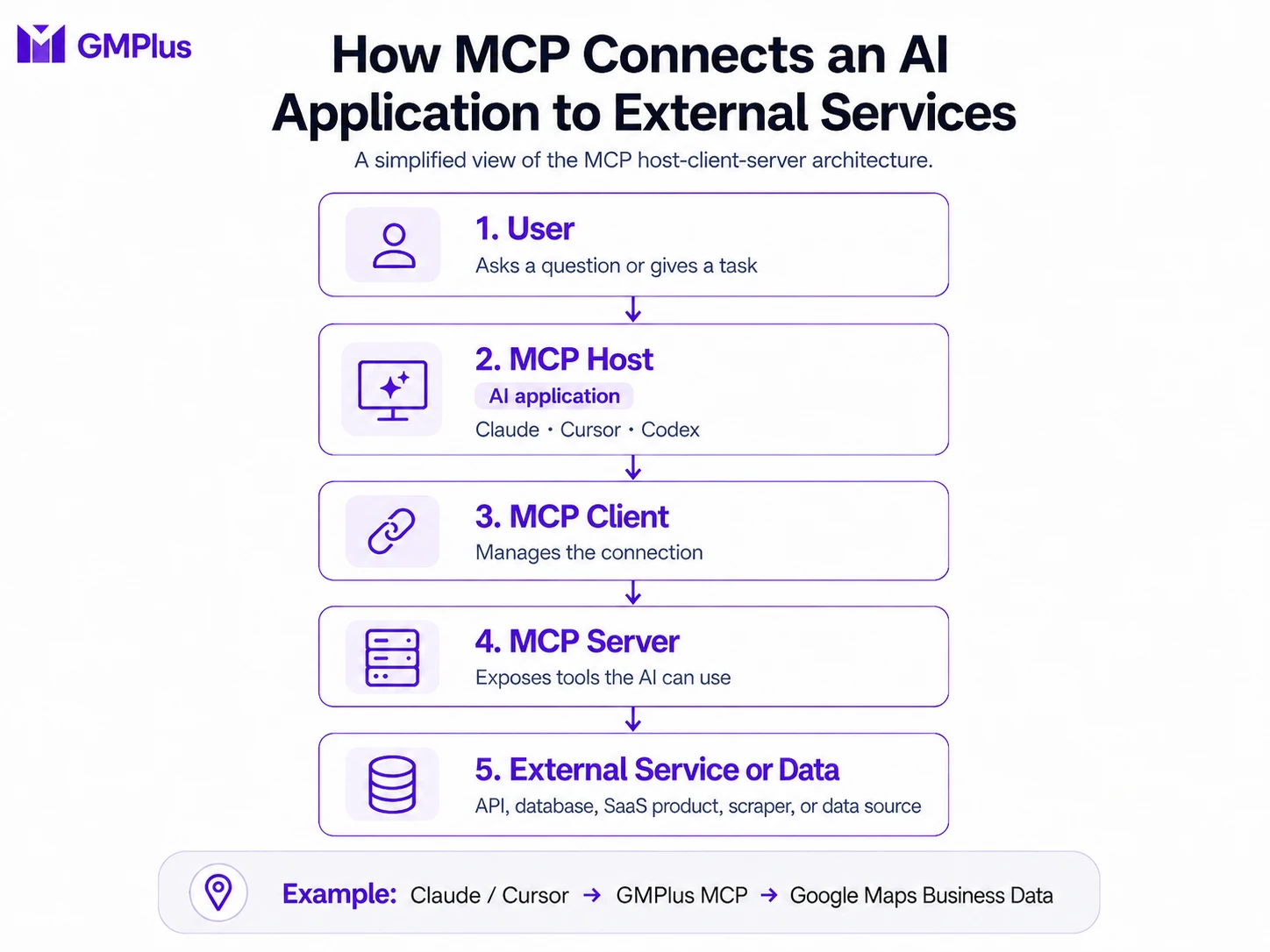
It is an open protocol that standardizes how AI applications connect to external tools, services and contextual data.
The current MCP architecture uses a host-client-server model. An MCP host is the AI application. It creates an MCP client for each MCP server it connects to, while the MCP server exposes capabilities such as tools, resources and prompts.
A simplified version looks like this:
In normal use, the user rarely interacts with the MCP client directly. It is generally managed by the host application.
For example:
The protocol defines how those components discover capabilities and exchange requests without requiring every AI application and every external service to invent a completely separate integration.
What Is an MCP Host?
The MCP host is the AI application in which the user is working.
Its responsibilities can include:
- connecting to one or more MCP servers;
- discovering what capabilities those servers provide;
- making the available tools accessible to the model;
- controlling permissions or approval;
- returning tool results to the model so it can continue the task.
MCP's official architecture describes applications such as Claude Code and Visual Studio Code as examples of hosts.
For most non-technical users, it is enough to think of the host as:
the AI application where you ask the question.
What Is an MCP Server?
An MCP server exposes external capabilities to an MCP-compatible AI application.
That server might connect to:
- an API;
- a database;
- a SaaS product;
- a search service;
- a scraper;
- a file system;
- or another external data source.
The MCP server is therefore not necessarily the original source of the information.
It acts as the standardized interface through which the AI application accesses the underlying capability.
For example:
The AI application does not need to understand how GMPlus retrieves or processes every field internally. It needs to understand the capabilities exposed by the MCP server.
What Is an MCP Tool?
An MCP tool is an executable function exposed by an MCP server.
Tools describe what actions the AI application can request and what inputs those actions accept.
Under the current MCP specification, clients can discover available tools and their metadata, including:
- tool name;
- description;
- input schema;
- required parameters;
- optional parameters.
The application can then expose those tools to the language model so it understands what external actions are available.
For example, one Google Maps-related MCP server might expose:
search_placesget_place_detailsget_reviews
If the user asks:
Find Italian restaurants in Boston.
the model may determine that search_places is relevant.
If the user then asks:
Show me what customers say about the top three.
the application may make a review-related tool available for the next part of the task.
The model can therefore use tool descriptions and the user's request to determine which tool is appropriate. The host application can still control which tools are available and whether approval is required.
How Does MCP Work?
The easiest way to understand MCP is through a task.
Suppose a user asks:
Find highly rated Italian restaurants in Boston and summarize the customer feedback for the top three.
An MCP-enabled workflow could look like this:
The user does not necessarily need to know:
- which endpoint to call;
- how to construct every request;
- which ID from one operation needs to be passed to another;
- or how several external operations should be orchestrated.
That logic can instead be handled by the AI application and the tools made available through MCP.
This is one of the major differences between giving an AI information and giving an AI access to tools.
Does Every API Endpoint Need Its Own MCP Tool?
No.
This is an important distinction.
MCP does not require a service to reproduce its entire API structure one endpoint at a time.
Imagine an existing service has separate APIs for:
- Search
- Place Details
- Reviews
- Photos
- Emails
- Export
One MCP implementation could expose six different tools.
Another could expose only:
- Search Businesses
- Fetch Results
and allow those two tools to return the business fields required by the workflow.
Both approaches can be valid.
MCP tool design is about exposing clear, useful actions to the model, not mechanically converting every API endpoint into an individual MCP tool.
GMPlus currently follows a relatively simple Search + Fetch model: its MCP product page identifies two tools for searching businesses and fetching results.
That means tool count alone does not tell you how capable an MCP server is.
A more useful question is:
Can the available tools provide the external data and actions required to complete the user's workflow?
MCP vs API vs Web Interface
MCP, APIs and web interfaces can expose related product capabilities, but they are designed for different ways of working.
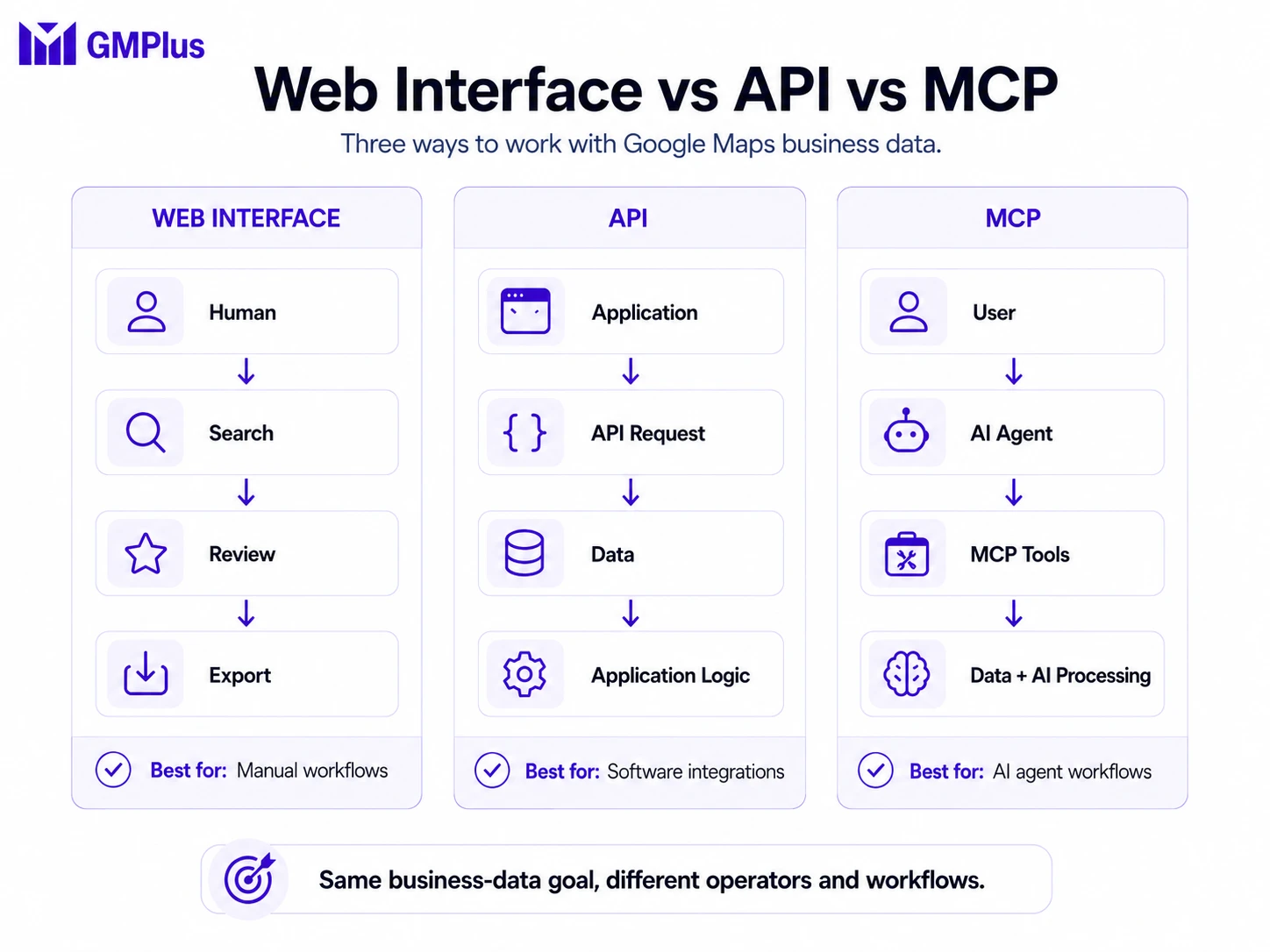
| Web Interface | API | MCP | |
|---|---|---|---|
| Main operator | Human | Application / developer | AI application / agent |
| Interaction | Click, search, filter, export | Code and requests | Natural-language task + tools |
| Who chooses the operation | User | Developer logic | Model can select available tools |
| Integration logic | Built into product UI | Written by developer | Exposed through MCP tools |
| Best for | Manual workflows | Software integrations | Agent workflows |
| AI processing | Usually separate | Developer builds it | Can happen in the same workflow |
Consider a Google Maps business-data task.
Web Interface
A user might:
This is often the simplest option when the user wants direct control.
API
A developer might write:
The developer controls the orchestration.
MCP
The user can instead describe the desired outcome:
Find 100 businesses, keep the ones that match these conditions and organize them for me.
The AI application can then use the external MCP tools required for the task and continue processing the returned data.
Does MCP Replace APIs?
No.
MCP should not be treated as a replacement for APIs.
Many MCP servers still rely on APIs or other existing services behind the scenes.
A common architecture remains:
The difference is that MCP provides a standardized AI-facing tool layer.
Instead of a developer manually deciding which API operation to call for every step, the AI application can discover the tools provided by the server and use them as part of an agent workflow.
What Is a Google Maps MCP Server?
A Google Maps MCP server is an MCP server that exposes capabilities related to locations, places or Google Maps data.
However, not every Google Maps-related MCP server is designed for the same task.
Some focus on geospatial grounding.
Some expose existing Maps APIs as MCP tools.
Others focus on structured business-data extraction.
These are better understood as different workflow patterns, not official MCP categories.
Different Types of Google Maps MCP Workflows
1. Maps and Geospatial Grounding
One common use case is giving an AI agent reliable information about physical places and spatial relationships.
Google's own Maps Grounding Lite is a clear example.
Its managed MCP server currently exposes three main tools:
search_placeslookup_weathercompute_routes
These allow compatible AI applications to search places, retrieve weather information, and calculate driving or walking route distance and duration. Google explicitly notes that Maps Grounding Lite does not provide step-by-step navigation or real-time traffic.
A typical request might be:
Find restaurants near Golden Gate Park and tell me how long it would take to walk to them.
This type of workflow mainly answers questions such as:
- What is near this location?
- What is the weather there?
- How far apart are these places?
2. API-Wrapper MCP
Another common approach is to take existing API capabilities and expose them as MCP tools.
For example, a service might already have APIs for:
- place search;
- place details;
- geocoding;
- reviews;
- routes;
- photos.
An MCP server can wrap selected capabilities so the AI application sees meaningful tools instead of raw HTTP endpoints.
The underlying data service has not necessarily changed.
What changes is the interface available to the AI.
3. Google Maps Business Data / Scraper MCP
A different workflow focuses on structured business and listing data.
Instead of asking:
How long does it take to drive there?
the user may ask:
Find 100 HVAC companies in Dallas and return their websites, phone numbers, ratings and available emails.
Typical fields can include:
- business name;
- phone number;
- website;
- available email;
- address;
- category;
- rating;
- review count;
- opening hours;
- Place ID;
- social links;
- and other supported business or listing fields.
These are the types of structured business fields that a Google Maps Extractor can collect for further research, filtering and analysis.
Once those records are returned, the AI can continue working with them.
This makes business-data MCP particularly relevant to:
- lead research;
- lead qualification;
- competitor research;
- local business discovery;
- local market research.
The distinction is useful because a geospatial MCP and a business-data MCP may both involve Google Maps while solving very different problems.
Google Maps MCP Workflow Types at a Glance
| Workflow | Typical request | Typical capabilities |
|---|---|---|
| Geospatial grounding | Find coffee shops nearby and calculate the route. | Places, weather, routes |
| API-wrapper MCP | Get details for this place. | Existing API capabilities exposed as tools |
| Business-data MCP | Find 100 businesses and return contact/listing fields. | Business, contact and listing data |
| Lead-research workflow | Find and qualify businesses that match these criteria. | Business search + contact data + AI filtering |
Google Maps MCP vs Google Maps Scraper MCP
Google Maps MCP is the broader term.
It can refer to servers offering:
- place discovery;
- weather;
- routes;
- geocoding;
- business information;
- or other Maps-related capabilities.
A Google Maps Scraper MCP is more specific.
It generally focuses on retrieving structured Google Maps business or listing data so that an AI agent can continue working with those records.
For example:
Geospatial Workflow
- Place search
- Weather
- Routes
API-Wrapper Workflow
- Existing API operations
- MCP tool interface
Business-Data / Scraper Workflow
- Business discovery
- Contact data
- Listing data
- Qualification
- Research
One is not universally better than another.
The appropriate choice depends on the task.
For travel, routing and place grounding, geospatial tools may be the natural fit.
For bulk business research and structured business records, a scraper or business-data MCP is more directly aligned with the workflow.
What Can AI Agents Do With Google Maps Business Data?
Once structured Google Maps business data is available inside an AI workflow, the task can continue beyond simple extraction.
Four useful examples are business discovery, qualification, lead research and local market research.
1. Find Local Businesses
The most basic workflow is business discovery.
For example:
Find 50 dental clinics in Austin. Return their business name, address, phone number, website, rating and review count.
The MCP server retrieves the external business data.
The agent can then continue working with those records without requiring the user to manually copy businesses from Google Maps into another application.
2. Qualify Business Results
Finding businesses is often only the first step.
A user might ask:
Find plumbers in Phoenix. Keep businesses with a website, a rating above 4.2 and at least 30 reviews.
If the MCP server returns:
- Website
- Rating
- Review count
the AI can apply the qualification criteria itself.
This does not necessarily require a dedicated filter_businesses MCP tool.
Filtering is already something the model can do well once the required data has been returned.
3. Build Business Lead Lists
Business-data MCP becomes more useful for lead research when contact fields are available.
If you are new to the underlying workflow, see our guide on how to generate leads from Google Maps before adding MCP automation.
For example:
Find 100 HVAC companies in Dallas. Return their business name, phone number, website and available email. Keep businesses rated above 4 stars.
GMPlus can expose the supported business, contact, location and listing fields available through its Google Maps Extractor to MCP clients, including available email data.
That difference matters.
The agent is not simply receiving a list of locations. It receives structured business records that can support further research and qualification.
4. Research Local Markets
Google Maps business data can also provide useful signals for local market analysis.
For example:
Compare coffee shops in Austin and Dallas by business count, average rating and review activity.
An agent could:
Other useful signals might include:
- category distribution;
- review counts;
- rating patterns;
- website availability;
- business concentration;
- contact-data availability.
However, these should be treated as listing-level market signals, not direct measures of revenue, sales or market share.
Google Maps data can support research, but it does not describe every aspect of a business or market.
How GMPlus Google Maps MCP Works
GMPlus provides a remote Google Maps Scraper MCP focused on structured business-data workflows.
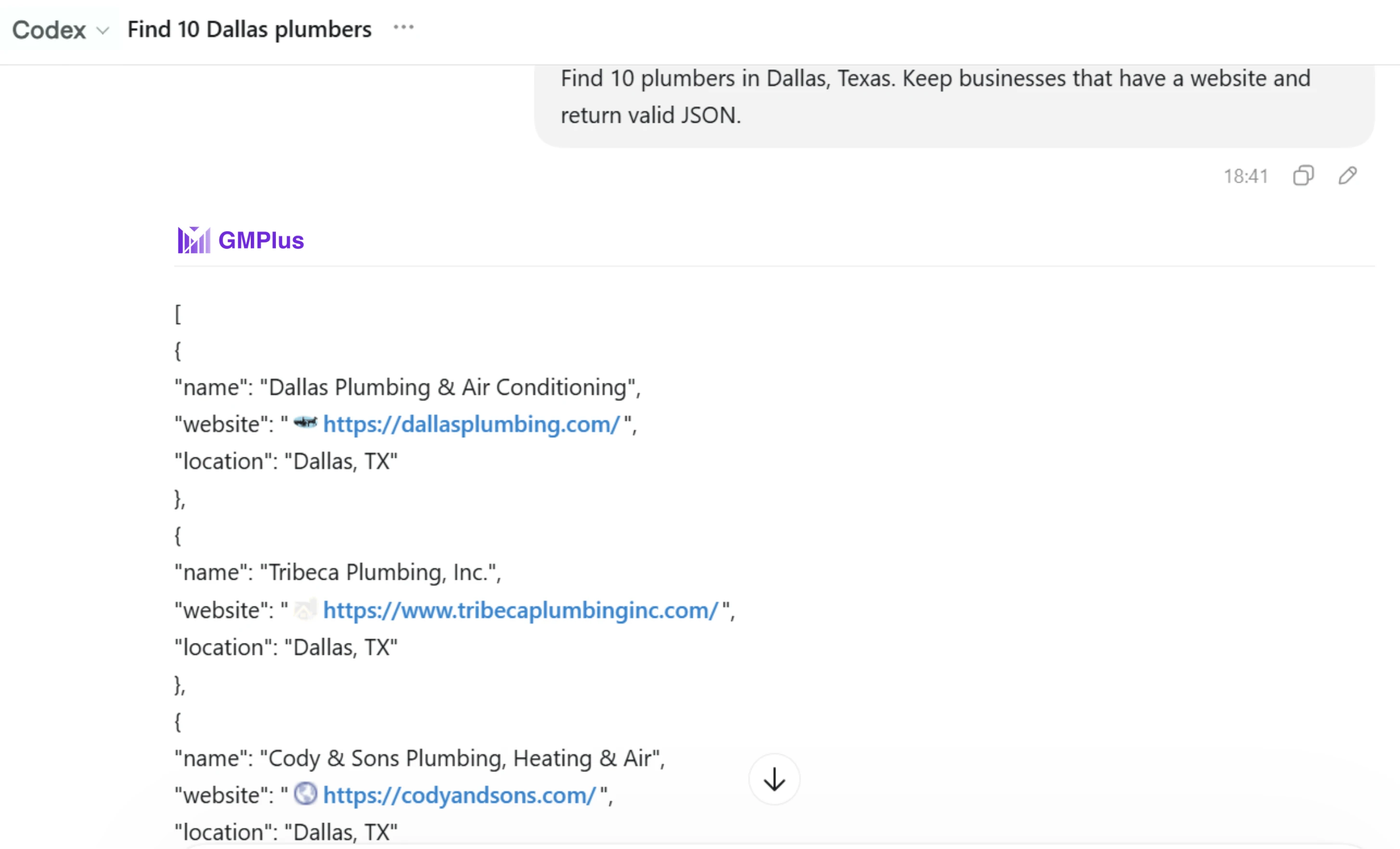
Its current MCP product is built around two core tools:
- Search Businesses
- Fetch Results
The overall workflow is:
GMPlus currently uses a remote Streamable HTTP MCP endpoint and authenticates connections with an API key passed as a Bearer token. Its existing product page provides configuration examples for Claude Code, Cursor, Codex and other compatible clients.
The MCP can expose the supported fields available from the GMPlus Google Maps Extractor, including business, contact, location and listing information such as:
- business name;
- website;
- phone number;
- available email;
- address;
- rating;
- review count;
- category;
- reviews;
- and other supported fields.
The AI can then handle operations that do not require another external data source, including:
- filtering;
- sorting;
- grouping;
- comparing;
- calculating;
- summarizing.
For example:
Find 50 restaurants in Chicago with available emails. Keep businesses rated above 4.3 with more than 100 reviews and sort them by review count.
GMPlus retrieves the external business records.
The AI applies the qualification and organization logic.
This separation is important:
GMPlus provides the external business data. The AI turns that data into the output required by the user's task.
When Should You Use MCP Instead of a Dashboard or API?
MCP is useful when the workflow begins inside an AI application and requires the AI to continue working with external data.
MCP Is a Good Fit When:
- you already work inside an MCP-compatible AI application;
- you want the agent to retrieve business data itself;
- the task involves several steps;
- you want the AI to filter or compare the returned records;
- you want to repeat research workflows using natural-language instructions;
- you are building an agent that requires Google Maps business data.
For example:
When a Web Interface May Be Simpler
A traditional Google Maps extractor dashboard may still be better when:
- you want to run a one-off search manually;
- you want to review records in a browser;
- you mainly need to extract and export data;
- you do not need an AI agent to continue processing the results.
The workflow may simply be:
There is no benefit in forcing MCP into a workflow that does not require an AI agent.
When an API May Be Better
An API can be more appropriate when:
- you are building a fixed software integration;
- you want deterministic application logic;
- your own application controls every step;
- there is no need for a language model to decide which action to perform.
For example:
The distinction is therefore not:
MCP is better than API.
It is:
MCP, API and web interfaces are optimized for different operators and workflows.
Do You Need to Be a Developer to Use Google Maps MCP?
Not necessarily.
Remote MCP servers reduce many of the technical steps that were common with early local MCP implementations.
With a hosted MCP server, users do not necessarily need to:
- clone a repository;
- run a local server;
- manage a runtime;
- deploy their own MCP infrastructure.
There is still usually some initial configuration.
For example, connecting GMPlus currently involves:
- creating an API key;
- adding the GMPlus MCP endpoint to a supported client;
- adding the API key for authentication;
- confirming that the tools are available;
- starting with a natural-language request.
After the server is connected, much of the actual work can happen through natural-language prompts.
For complete client-specific configuration, it is better to use the dedicated GMPlus MCP setup instructions rather than repeat the full setup process here.
Example Google Maps MCP Prompts
Once an MCP server is connected, the useful part is not the connection itself. It is the workflows the agent can complete with the available data.
Business Discovery
Find 30 coffee shops in Portland, Oregon. Return business name, address, website, phone number, rating and review count.
Lead Research
Find 50 roofing companies in Tampa and return their business name, website, phone number and available email.
Business Qualification
Find dental clinics in Phoenix. Keep businesses rated above 4.5 with more than 50 reviews, a website and an available email.
Competitor Research
Find fitness centers in downtown Austin and compare their ratings, review counts, websites and contact availability.
Local Market Research
Compare yoga studios in Austin and Dallas by number of businesses, average rating, review activity and website availability.
The same MCP connection can support all of these tasks.
What changes is the goal given to the agent, not necessarily the MCP tools themselves.
Frequently Asked Questions About Google Maps MCP
What does MCP stand for?
MCP stands for Model Context Protocol.
It is an open protocol for connecting AI applications to external tools, services and contextual data. The current MCP specification uses a client-server architecture in which AI hosts connect to MCP servers and discover capabilities such as tools.
Is a Google Maps MCP server the same as the Google Maps API?
No.
A Google Maps-related API exposes programmatic endpoints for developers or applications. An MCP server exposes AI-readable capabilities that an MCP-compatible application can discover and use.
An MCP server may still rely on APIs behind the scenes.
Does MCP replace APIs?
No.
MCP is often an integration layer over existing APIs or services.
The API can continue providing the underlying data or functionality while MCP describes those capabilities as tools that an AI application can use.
What is a Google Maps Scraper MCP?
A Google Maps Scraper MCP is an MCP server focused on retrieving structured Google Maps business or listing data for use inside AI workflows.
Typical tasks include business discovery, lead research, qualification, competitor research and local market analysis.
Can a Google Maps MCP retrieve email addresses?
It depends on the provider.
Google Maps does not expose a standard email field for every business listing. Whether an MCP workflow can return emails therefore depends on the data and enrichment capabilities of the service behind the MCP server.
GMPlus can return available email data for supported business records through its Google Maps email extraction capability, and those supported fields can also be accessed through its MCP workflow.
Can an AI automatically choose an MCP tool?
An MCP-compatible application can make discovered tools available to the model, allowing it to select and request a relevant tool based on the conversation.
The host application can still control tool availability, permissions and approval requirements.
Do more MCP tools mean a more powerful MCP server?
Not necessarily.
One server may expose many narrowly defined tools, while another may expose a smaller number of broader workflow-oriented tools.
What matters is whether the server exposes the capabilities and data required to complete the target task.