GMPlus vs Outscraper: Quick Verdict
Both tools can extract Google Maps business data.
The bigger difference is how much infrastructure you need around that task.
Choose GMPlus if you:
- Mainly need Google Maps business data
- Want a focused search → extract → export workflow
- Do not want to install a browser extension or configure a Google Maps API key
- Want free credits that refresh every day
- Want available emails collected within the same extraction workflow
- Prefer structured business-level results that are easy to review and export
- Want CSV, XLSX or JSON files
Choose Outscraper if you:
- Need deeper contact enrichment and multiple contacts for some companies
- Need Google Maps plus additional data sources
- Want traditional API access for application integrations
- Need a wider catalog of enrichment services
- Expect to build larger automated data workflows
- Need Parquet exports
The short version: GMPlus is the more focused option when the job starts with Google Maps and ends with a structured business dataset. Outscraper is the broader option when Google Maps is one part of a larger enrichment or developer workflow.
We Put GMPlus and Outscraper Through the Same Search Task
Feature lists only tell part of the story, so we ran a practical test in both platforms.
Test Setup
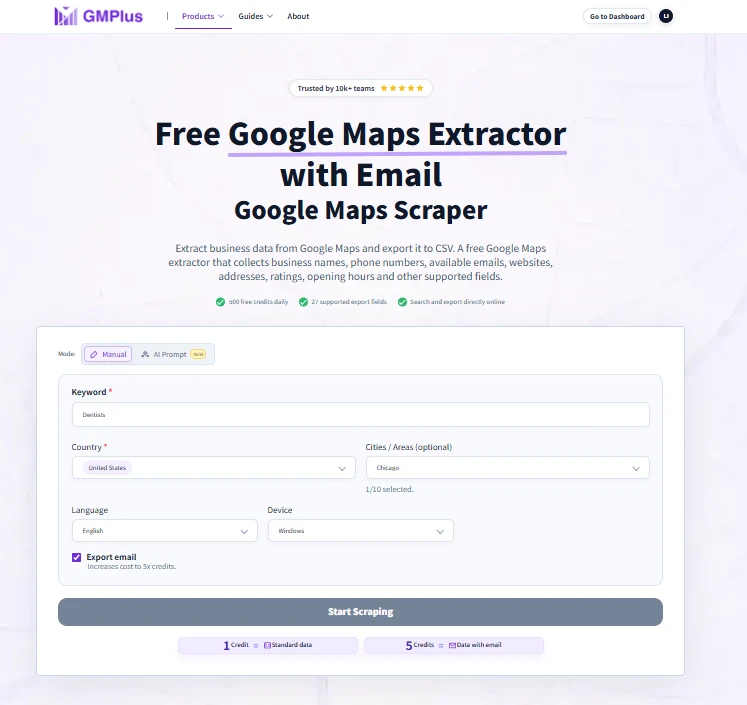
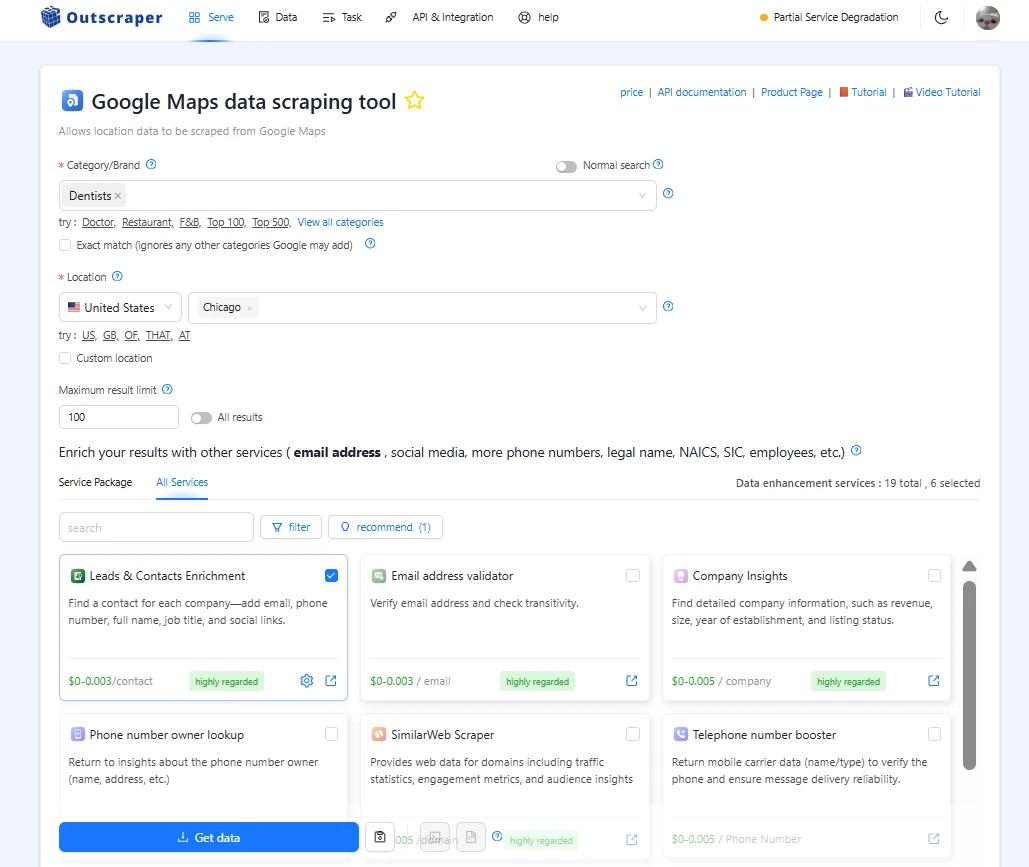
- Business category: Dentists
- Requested location: Chicago, United States
- Target: 100 businesses
- Contact/email enrichment: Enabled
GMPlus was run with email extraction enabled.
Outscraper was run with Leads & Contacts Enrichment only, without Email Validator, Company Insights or other optional enrichment services.
The two enrichment systems are not identical. Outscraper can return contact names, job titles, phone numbers, emails and social information, and it can return multiple contacts for one business. GMPlus keeps email discovery closer to the business-level Google Maps extraction workflow.
Important Test Note
We entered the same requested category, city and 100-business limit in both tools.
However, the exported datasets show that the two platforms interpreted the Chicago search differently and did not return the exact same 100 businesses.
The numbers below therefore compare the actual workflow and output from each test run, rather than acting as a controlled same-record email coverage benchmark.
Test Results
| Metric | GMPlus | Outscraper |
|---|---|---|
| Requested businesses | 100 | 100 |
| Unique businesses returned | 100 | 100 |
| Businesses with phone numbers | 100 | 100 |
| Businesses with websites | 95 | 100 |
| Businesses with at least one email | 33 | 74 |
| Email coverage in this run | 33% | 74% |
| Output structure | 1 row per business in this test | Multiple contact rows possible |
| Export rows | 100 | 185 |
| Full task time | Under 1 minute | Over 1 hour in this run* |
| Test usage / charge | 500 credits | $0.00 charged |
| Export formats | CSV / XLSX / JSON | CSV / Excel / JSON / Parquet |
GMPlus returned 100 business records, including 100 with phones, 95 with websites and 33 with at least one available email. Outscraper's enriched export contained 100 unique businesses across 185 rows because some businesses had multiple enriched contacts.
Test note: The two tools did not return exactly the same businesses, and Outscraper displayed a Partial Service Degradation notice during the enrichment test. Results reflect these specific test runs and should not be treated as universal performance benchmarks.
What We Learned from the Test
Outscraper returned deeper contact enrichment in this run
Outscraper returned at least one email for 74 of the 100 businesses in its result set, compared with 33 of the 100 businesses returned by GMPlus.
It also returned multiple contacts for some companies, expanding 100 unique businesses into 185 export rows.
If the main objective is to maximize contact depth around each company, Outscraper's enrichment model was stronger in this test.
Because the two tools did not return exactly the same companies, however, the 74% and 33% figures should be read as observed results from each run, not as a controlled head-to-head email benchmark.
GMPlus completed the full workflow much faster in this run
GMPlus returned all 100 requested businesses with email extraction enabled in under one minute.
Outscraper's basic Google Maps extraction also completed quickly. The longer wait appeared after Leads & Contacts Enrichment was added, with the enriched task remaining in processing for more than an hour before eventually completing.
The service degradation notice shown by Outscraper during the test is an important qualification, so we do not present this as Outscraper's typical enrichment speed.
The output is designed for different jobs
GMPlus returned one structured row for each business in this test.
Outscraper returned 100 businesses across 185 rows because some businesses were associated with several enriched contacts.
Multiple contact rows are useful when the goal is deeper prospecting.
A one-business-per-row structure is easier when the goal is to quickly review, filter and export a Google Maps business list.
That difference captures the broader product positioning:
GMPlus prioritizes a focused Google Maps extraction workflow. Outscraper prioritizes a broader enrichment workflow around the business.
GMPlus vs Outscraper at a Glance
| Feature | GMPlus | Outscraper |
|---|---|---|
| Main focus | Focused Google Maps business extraction | Multi-source business data and enrichment |
| Google Maps business data | Yes | Yes |
| Online no-code workflow | Yes | Yes |
| Browser extension required | No | No |
| Standard free usage | 500 credits every day | First 500 Google Maps places free in current pricing tier |
| Standard Google Maps record | 1 credit | Included in Google Maps usage |
| Email/contact enrichment | 5 credits per record when selected | Separate Emails & Contacts / enrichment workflow |
| Google Maps fields | Up to 27 supported fields | Broad Google Maps data plus optional enrichments |
| CSV | Yes | Yes |
| Excel / XLSX | Yes | Yes |
| JSON | Yes | Yes |
| Parquet | No | Yes |
| Traditional API workflow | Not the primary standard workflow | Yes |
| MCP / AI workflow | Hosted MCP integration | Remote MCP / custom connector |
| Broader external data services | Google Maps-focused workflow | Broader multi-source platform |
| Best fit | Fast, focused Google Maps extraction | Contact enrichment, APIs and broader data workflows |
GMPlus currently provides 500 credits every day. A standard record uses 1 credit and a record with email extraction selected uses 5 credits. GMPlus also supports up to 27 current Google Maps export fields.
Outscraper currently lists the first 500 Google Maps businesses at $0, followed by $3 per 1,000 records from 501–100,000 and $1 per 1,000 above 100,000. Its pricing tiers reset every 30 days.
What Are GMPlus and Outscraper Built For?
GMPlus
GMPlus is built around a narrower task:
Find businesses on Google Maps and turn them into structured data quickly.
A standard workflow is:
No browser extension, Google Maps API key or coding is required for the normal online workflow.
GMPlus currently supports up to 27 fields, including:
- Business name
- Phone number
- Available email
- Website
- Public social links
- Full address
- Business categories
- Rating
- Review count
- Opening hours
- Google Maps URL
- Place ID
- CID
- Latitude and longitude
- Featured image
- Booking URL
- Other supported listing fields
The purpose is not to turn every Google Maps search into a large data-engineering project. It is to help users move from a business search to a usable dataset with fewer steps.
Outscraper
Outscraper is broader.
Google Maps scraping is one service inside a larger business data and enrichment platform with APIs, contact enrichment and additional data services.
That wider scope becomes valuable when the workflow extends beyond Google Maps itself.
Key Differences Between GMPlus and Outscraper
1. Google Maps Extraction Workflow
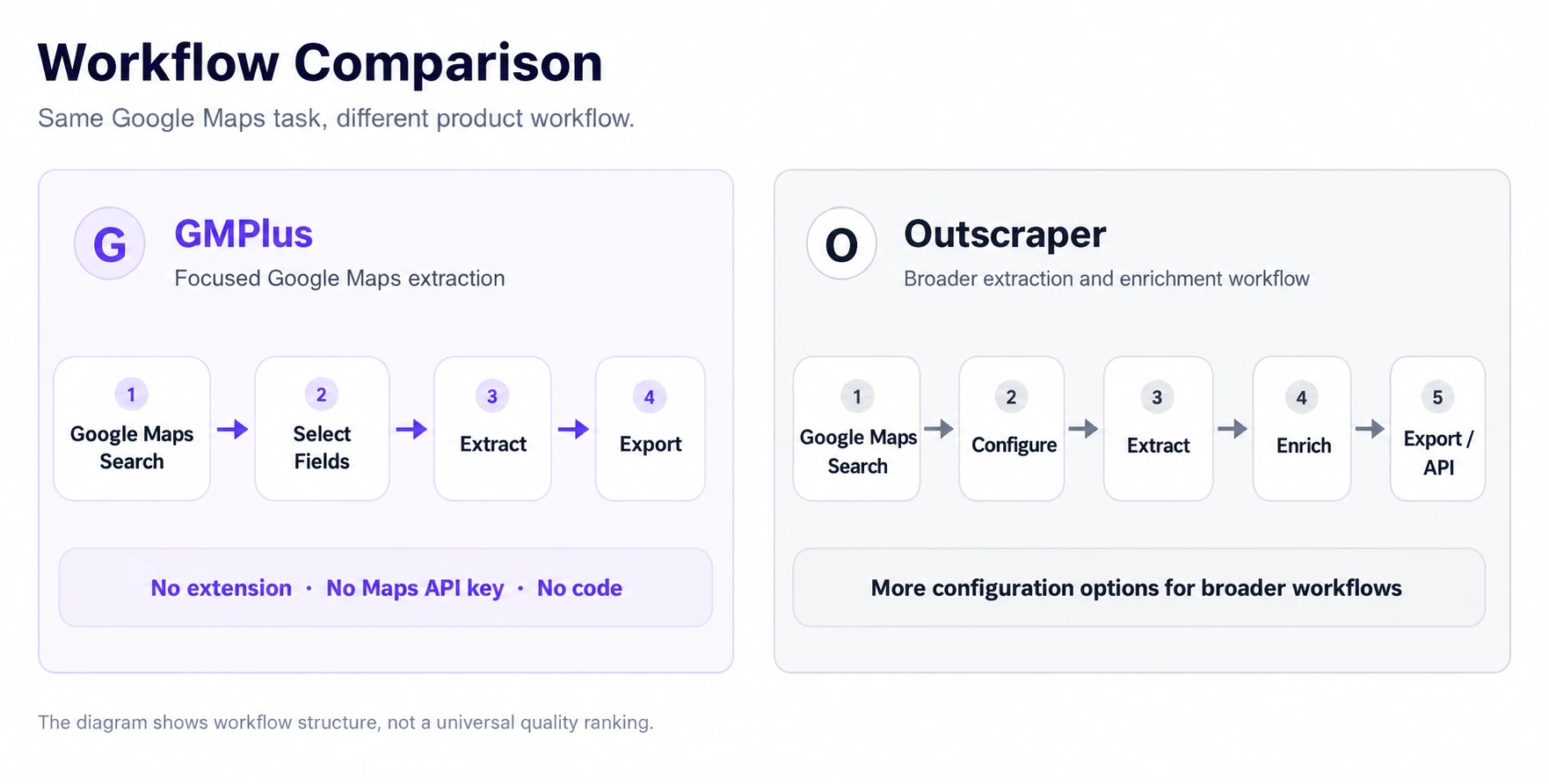
GMPlus keeps the workflow centered on the Google Maps task itself.
A typical extraction is:
- Enter a business category or keyword
- Choose the target location
- Select whether email extraction is needed
- Start the task
- Export the completed results
There is no extension, Google Maps API key or coding requirement for this standard workflow.
Outscraper also provides a web-based Google Maps workflow, but users can add filters, enrichment services and other data operations around the base task.
That is useful when additional processing is required.
It also means there are more decisions around the extraction.
For users whose main goal is simply:
GMPlus keeps the process closer to that single job.
2. Business Data and Contact Enrichment
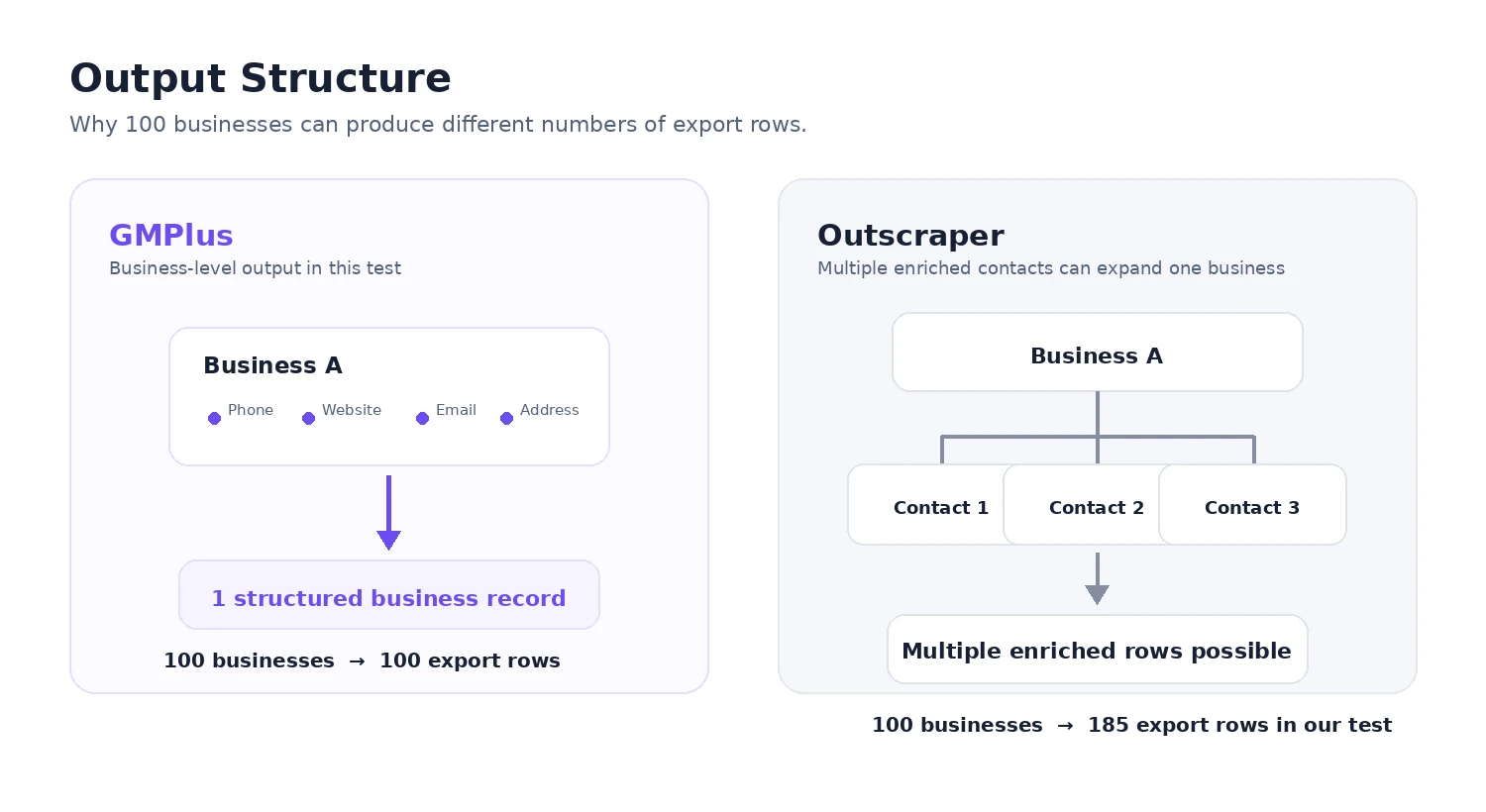
Both tools can return more than business names and addresses.
GMPlus can collect supported business information including phone numbers, websites, available emails, public social links, ratings, review counts, opening hours, Maps identifiers and location information.
Field availability varies by business.
In particular, GMPlus only returns an available email when one can be found through supported public sources associated with the business.
Outscraper goes further into contact enrichment.
Its Emails & Contacts tools can search public sources for email addresses, phone numbers and social profiles, while its broader enrichment workflow can produce multiple contact records around one company.
That distinction was visible in our test.
Outscraper produced more contact depth.
GMPlus produced a more compact business-level dataset.
3. Email Extraction
GMPlus treats email extraction as a direct option inside the Google Maps task.
A standard business record uses:
1 credit
A record with email extraction selected uses:
5 credits
Each account currently receives:
500 free credits every day
That means the daily allowance can currently cover up to:
500 standard records
or:
100 records when email extraction is selected for every record
In our test, 100 email-enabled records used exactly 500 credits.
Outscraper separates contact enrichment from the basic Google Maps record.
Its Emails & Contacts product currently has its own free tier, with the first 500 contacts listed at $0.
This allows deeper contact discovery, but users running larger workflows should pay attention to both the base Google Maps usage and any enrichment usage.
4. Processing Time and Workflow Complexity
Basic Google Maps extraction was fast in both tools during our testing.
The difference appeared when enrichment was included.
GMPlus completed the full 100-business task with email extraction enabled in under one minute.
Outscraper's basic Google Maps task completed quickly, while its Leads & Contacts Enrichment stage took significantly longer during this specific run.
Again, Outscraper was showing Partial Service Degradation at the time, so the result should not be generalized into a claim that Outscraper normally takes more than an hour.
What the test does show is a structural difference:
GMPlus handles available email discovery inside a compact Google Maps extraction workflow.
Outscraper can perform a deeper enrichment stage around the businesses it collects.
5. Free Usage and Pricing
Both tools let users start without paying, but their free models work differently.
GMPlus
GMPlus provides:
500 free credits every day
Credits refresh daily.
Current usage is:
- 1 credit for a standard record
- 5 credits for a record with email extraction selected
This model is particularly useful when users run smaller Google Maps tasks repeatedly rather than processing one large dataset at once.
Outscraper
Outscraper currently publishes the following Google Maps pricing:
| Usage | Current Price |
|---|---|
| First 500 places | $0 |
| 501–100,000 | $3 / 1,000 records |
| Above 100,000 | $1 / 1,000 records |
Its pricing is pay-as-you-go and the published tiers reset every 30 days.
Its Emails & Contacts service also currently has a separate free tier before paid usage begins.
That explains why our 100-business Outscraper test showed:
$0.00 charged
even though contact enrichment was enabled.
So neither tool has a simple monopoly on “free.”
The important difference is the usage model:
GMPlus gives users a recurring daily allowance.
Outscraper combines free usage with published volume tiers across individual services.
6. Export Formats
GMPlus supports:
CSV · XLSX · JSON
Outscraper supports:
CSV · Excel · JSON · Parquet
For normal spreadsheet, research and lead-list workflows, both support the common formats.
Outscraper has the clear advantage if Parquet is required for a larger data pipeline.
7. Developer and AI Workflows
The two products should not be compared as if they offer the same developer model.
Outscraper has established traditional API access for users building application integrations and automated data pipelines.
It also now provides a Remote MCP workflow that can connect Outscraper to AI clients such as Claude and ChatGPT using an Outscraper API token.
GMPlus's primary experience remains its online Google Maps extractor.
GMPlus also provides a hosted MCP integration for supported clients including Claude Desktop, Cursor, VS Code and Codex.
So the distinction is no longer:
MCP vs no MCP.
It is closer to:
GMPlus: online extractor + focused hosted MCP workflow
Outscraper: broader APIs + Remote MCP + data platform
If traditional application APIs are central to the project, Outscraper has the stronger developer proposition.
If the goal is to extract Google Maps data without building an application integration, that advantage may not matter.
Why GMPlus Can Be a Practical Outscraper Alternative
GMPlus is most competitive when users do not need the entire Outscraper platform.
A More Focused Google Maps Workflow
GMPlus keeps the task centered on finding businesses and exporting structured Google Maps data.
There is no need to start by deciding between a large catalog of data products.
For a standard task, the workflow remains:
Fast Completion in Our Test
With email extraction enabled, GMPlus completed the 100-business task in under one minute.
That makes it particularly relevant for users who want to run a search, inspect the results and move on without waiting for a separate deep-enrichment process.
Free Credits That Return Every Day
GMPlus provides 500 free credits every day, rather than a one-time introductory allowance.
For smaller recurring searches, that creates a straightforward usage pattern:
Run a task today.
Use the refreshed allowance again tomorrow.
Predictable Email Credit Usage
When email extraction is selected, the current cost is fixed at:
5 credits per returned record
Users can therefore estimate the credit requirement before starting the task.
For example:
100 email-enabled records = 500 credits
Business-Level Output
In our test, GMPlus returned 100 businesses as 100 rows.
That structure is convenient when the goal is:
- Reviewing local businesses
- Building a prospect list
- Comparing competitors
- Researching a market by category and location
- Finding businesses with websites
- Finding available business contact information
- Identifying suppliers or partners
Outscraper's multi-contact output can provide deeper enrichment.
GMPlus's strength is keeping the resulting business list easier to work with when that depth is not required.
Where Outscraper Is Stronger
A useful comparison should also make the competitor's advantages clear.
Deeper Contact Enrichment
This was the clearest Outscraper advantage in our test.
Outscraper returned at least one email for 74 businesses in its own 100-business result set and produced multiple enriched contacts for some companies.
GMPlus returned at least one available email for 33 businesses in its own result set.
Because the platforms returned different businesses, this is not a controlled email-coverage benchmark.
It does, however, illustrate Outscraper's stronger emphasis on contact depth.
Broader Data Platform
Outscraper extends well beyond one Google Maps extraction workflow and offers many additional data and enrichment services.
Traditional API Access
For teams building backend integrations and automated application workflows, Outscraper provides established APIs.
Parquet Export
Outscraper supports Parquet alongside CSV, Excel and JSON.
Larger Volume Pricing
Outscraper publishes explicit per-1,000-record pricing for larger Google Maps workloads.
If these capabilities are central to the job, Outscraper may be the better fit.
GMPlus vs Outscraper: Which Should You Choose?
Neither tool is the better option for every workflow.
GMPlus is likely the better fit when:
- Google Maps is the main data source you need
- You want a faster, focused extraction workflow
- You want to work directly online without an extension or Maps API key
- You prefer a recurring daily free allowance
- You want available email extraction without running a broader enrichment stack
- You want a structured business list that is easy to review and export
- CSV, XLSX or JSON covers your export needs
Outscraper is likely the better fit when:
- Contact enrichment depth matters more than workflow simplicity
- You want multiple contacts around individual companies
- You need several external data sources
- Traditional APIs are central to your workflow
- You need Parquet
- You expect to process much larger paid datasets
- You need a broader business-data platform rather than a focused Google Maps extractor
The decision does not need to come down to:
Which product has more features?
A better question is:
Which product adds the right amount of workflow for the job I actually need to complete?
For users who mainly need to turn Google Maps results into structured business records, GMPlus is deliberately more focused.
For users who need deeper enrichment, APIs and a wider data stack, Outscraper provides more infrastructure.
Frequently Asked Questions About GMPlus and Outscraper
What is a good Outscraper alternative for Google Maps?
GMPlus is a practical Outscraper alternative if your main task is extracting structured Google Maps business data rather than building a broader data-enrichment workflow. It works directly online, supports up to 27 business data fields, and does not require a browser extension, Google Maps API key or coding for the standard extraction workflow.
Is GMPlus a free Outscraper alternative?
GMPlus provides 500 free credits every day. A standard record uses 1 credit, while a record with email extraction selected uses 5 credits.
Outscraper also offers free usage. Its current pricing includes the first 500 Google Maps businesses and first 500 Emails & Contacts contacts at $0, with usage tiers resetting every 30 days.
The main difference is the model: GMPlus refreshes its free credits daily, while Outscraper uses service-specific usage tiers.
What did the GMPlus vs Outscraper test show?
Both tools returned the requested 100 businesses. In our runs, GMPlus completed its email-enabled task in under one minute and returned one row per business. Outscraper returned emails for more businesses and produced multiple contact rows for some companies. The two tools did not return exactly the same businesses, and Outscraper displayed a service degradation notice during the enrichment run, so these results should be treated as observations from this test rather than universal performance benchmarks.
Does GMPlus require a browser extension or Google Maps API key?
No. GMPlus's standard Google Maps extraction workflow runs directly online. You do not need to install a browser extension, configure a Google Maps API key or write code to search, extract and export business data.
Does GMPlus offer the same developer options as Outscraper?
Not exactly. Outscraper provides traditional API access as well as a Remote MCP workflow. GMPlus's primary product is its online extractor, with a hosted MCP integration available for supported AI clients. If a traditional scraping API is central to your application, Outscraper currently offers the broader developer workflow.
Why did Outscraper return 185 rows for 100 businesses in our test?
Because Outscraper can return multiple enriched contacts for the same business. The test contained 100 unique businesses across 185 export rows. This does not mean Outscraper found 185 businesses; some businesses appeared more than once because different contacts were returned. GMPlus's test output contained one row for each of its 100 business records.
Sources & Disclosure
This comparison is published by GMPlus. Outscraper product, feature and pricing information was reviewed using publicly available official documentation. Test limitations are explained in the test section above.
Sources:GMPlus DocsOutscraper Google MapsPricingLeads & Contacts